jump to content
Quotation Cart: 0 articles

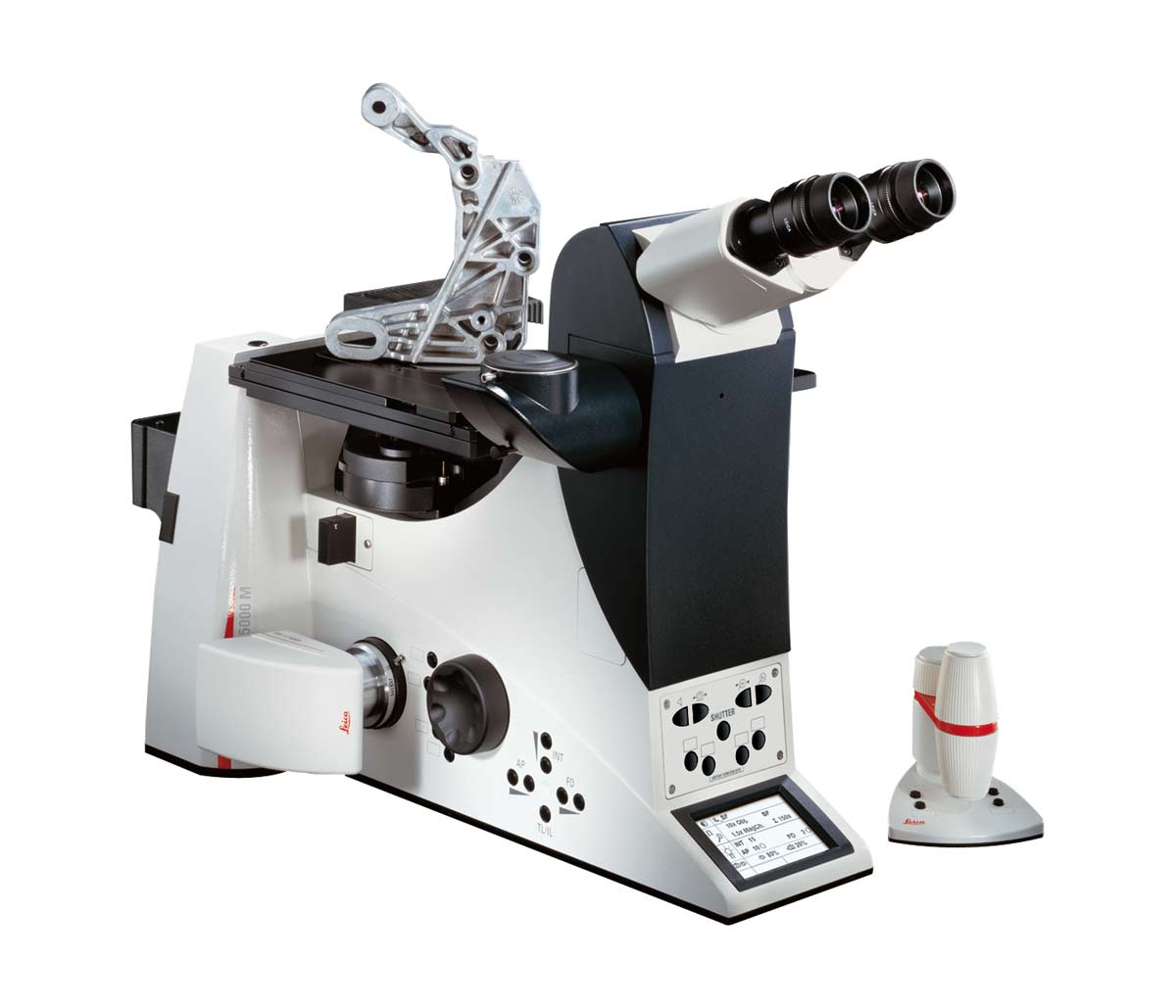
Images Leica DMI5000 M

A Perfect Tool

A Perfect Tool

Leica DMI5000 M for reflected light and transmitted light examinations with manual stage, motorized objective turret, motorized focus and a Leica DFC295 camera.

Click here to download the specifications.

Examination for Steel Purity

Examination for Steel Purity

A microscope system used for assessing the purity of steel must meet stringent requirements. The system illustrated here is a fully integrated solution: The Leica DFC295 digital camera, the DMI5000 M microscope and the Steel-Expert application software for an ultra fast automatic steel inclusion rating.

The motorized 5x objective turret

The motorized 5x objective turret

A touch of the button is enough to change the objective. The display shows the current objective magnification and the overall magnification immediately.

Motorized camera outputs

Motorized camera outputs

For documentation of results cameras are equiped to the DMI5000 M either on the right or on the left side of the microscope. A motorized disk with four positions that can be equipped to suit your individual requirement controls the two lateral ports. Beam splitters can be installed, which direct 100%, 80% or 50% of the light as desired to the left or right output port. All you need to do is touch a button to set it to the desired position.

Manual switchable camera output

Manual switchable camera output

The top camera port on the tube is for manual use. Switch settings are 0/100% or 100/0%.

Status display

Status display

All current settings of the Leica DMI 5000 M microscope at a glance: the current contrast mode, selected magnification, specified lighting parameters, selected camera output and information on the focus level can all be read from the display.

Illumination Manager

Illumination Manager

The Leica illumination manager, located on the left side of the Leica DMI 5000 M, enables personalized settings of aperture and light intensity values. The device stores the light intensity and field and aperture stop values that you specify for every objective. You can also switch between reflected and transmitted light at the touch of a button. The manager stores every change and indicates it in the display.

Contrast Manager

Contrast Manager

Manual operation of reflectors is now a relic of the past. With the Leica DMI 5000 M it is enough to touch the “DF” button and darkfield contrast is adjusted automatically. The microscope knows the appropriate reflector required for dark field contrast and inserts it into the optical path.

Four of the freely programmable buttons are located on the left side of the microscope. Three additional keys on the right side are also available. If you use the SmartMove remote control an additional four freely programmable buttons can be utilized. Each of the buttons makes it possible to configure a microscope to match your requirements perfectly.

The Focus Manager

The Focus Manager

The Focus Manager stores, manages and travels to two focal planes and is located on the right-hand side of the Leica DMI 5000 M  microscope. In addition to storing the focal plane, a lower level can be stored to ensure reliable objective changing, even with complex stage setups. The parfocal function of the Leica DMI 5000 M with a motorized focus drive compensates fully automatically for different focus levels.

Clearly designed controls

Clearly designed controls

The front control panel shows the most important functions. Every reflector cube can be directly controlled. Touch a button to open or close the shutter, switch the camera output or adjust the interim magnification of the specimen. Feedback is provided immediately on the display.

Constant Color Intensity Control (CCIC)

Constant Color Intensity Control (CCIC)

The reflected-light axis of the Leica DMI5000 M has an automatic CCIC module. It consists of a glass disk with a step-less blue filter. Thanks to its voltage-dependent rotation, this module ensures a constant incident-light color temperature of 3200 K. Even at low lamp voltages your images of such items as steel or ceramic specimens will no longer have a red cast – color rendition no longer depends on the lamp intensity.

Add components with ease

Add components with ease

Reflectors for contrast processes or fluorescence ­filters can be added through the access port. It opens at the touch of a button; the reflector can be replaced in seconds.

Dimensions

Dimensions


ImprintLegal NoticeContact Webmaster

Deutsch日本語한국어